
1. Log in to your cPanel account.
Go to your cPanel login page (e.g., yourdomain.com/cpanel) and enter your credentials to log in.
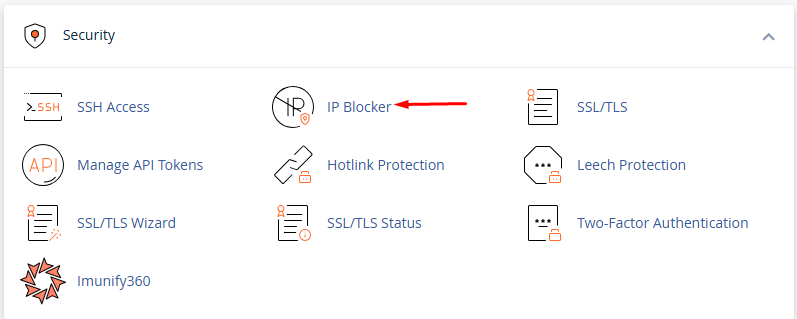
2. Scroll down to the Security section and click on IP Blocker.
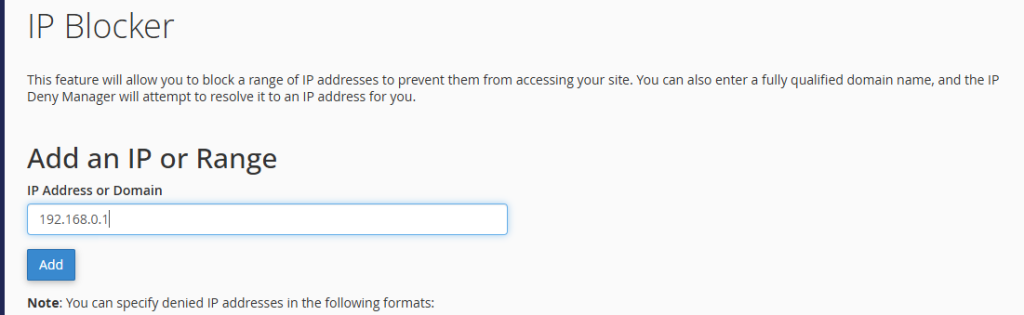
3. In the Add an IP or Range field, enter the IP address or range you want to block.
Example:
- Single IP: 192.168.1.1
- Range: 192.168.1.1-192.168.1.255
- CIDR: 192.168.1.0/24
- Click Add to block the IP.
Unblocking an IP Address:
- Go to cPanel > IP Blocker.
- Find the blocked IP in the Currently Blocked IP Addresses list.
- Click Delete next to the IP you want to unblock.
- Confirm the deletion to remove the block.
Alternative Method Using .htaccess
If you prefer using .htaccess, you can manually block an IP by adding the following lines to your .htaccess file:
To Block an IP:
Deny from 192.168.1.1
To Unblock an IP:
Simply remove the Deny from line corresponding to the IP.