
1. Login to the cPanel:
Go to yourdomain.com/cpanel.
Enter your username and password.
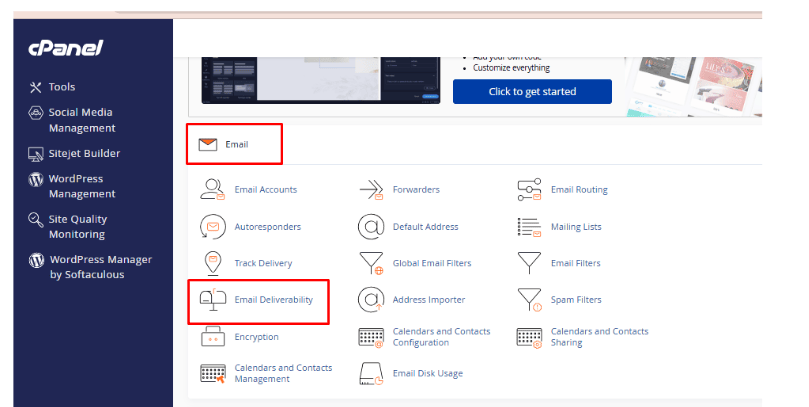
2. Go the email section:
Click on the “Email Deliverability” option.
3. Click on the manage button in front of the desired domain name:
Scroll to the DKIM section.
If it’s not enabled, you’ll see a button that says “Enable” or “Repair”.
Click Enable (or Repair if it’s broken).
4. Click on Generate local DKIM key button:
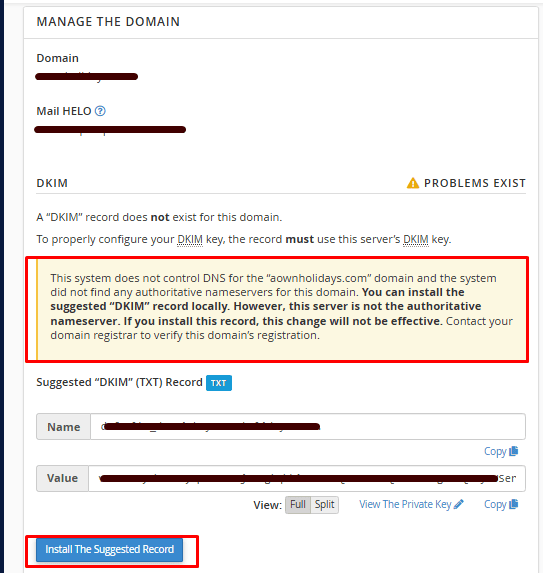
5. Next, click on the install the suggested record.
6. You will need to wait for few minutes till the suggested records installation is in process.
7. If the installation is done successfully it shall be visible as valid.
Note :To enable DKIM (DomainKeys Identified Mail) from your hosting control panel (like cPanel, Plesk, DirectAdmin, etc.), the steps can vary slightly depending on the panel you’re using.