
1. Log in to WHM:
Use your root credentials to log into WHM (https://yourserverip:2087).
2. Find the cPanel Account:
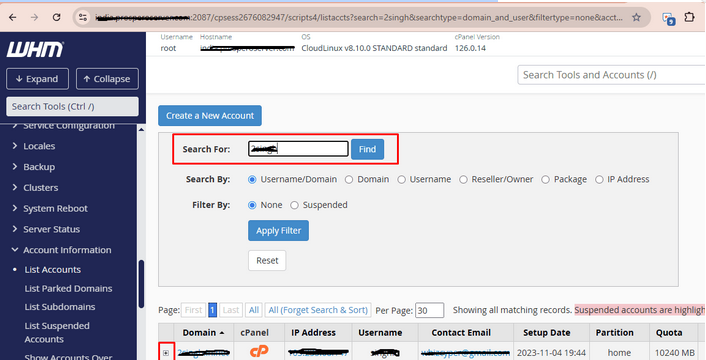
In the search bar, type: List Accounts
Click on List Accounts under Account Information.
Find the cPanel account you want to give reseller privileges to.
3. Modify the Account:
To the right of the account, click the “+” icon or use the “Modify Account” option.
This will take you to a page where you can change account properties.
4. Assign Reseller Ownership:
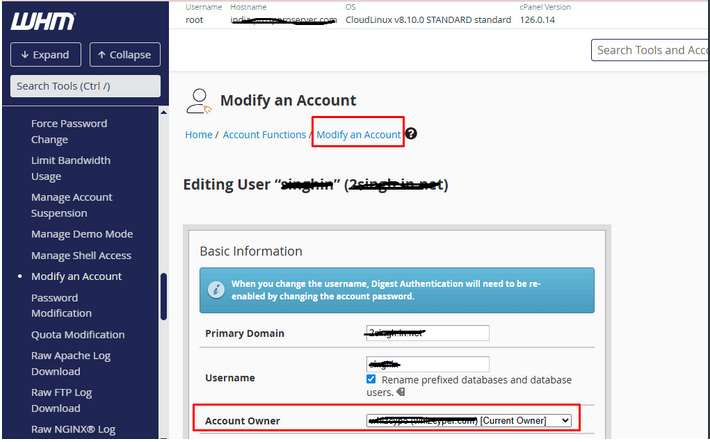
Scroll down to the “Account Owner” or “Reseller/Owner” section.
Click the dropdown list next to Account Owner.
Select the reseller account that you want to set as the new owner.
5. Save the Changes:
After selecting the new owner, scroll down and click on “Save All Settings” to apply the changes.